You have a Prestashop website and you want to increase sales? The first thing you need to do is make your website load faster! Optimization of the website is very much essential nowadays. Fast page loading time and high website performance will make your customers satisfied and have a great shopping experience on your Prestashop store. With Super Speed, an all-in-one speed optimization tool for Prestashop, you will have the most innovative speed optimization solutions which lacking in Prestashop by default (for example page cache, image optimization, database optimization, etc.). The purpose of the optimization of a web page is very simple. You need to make it faster and responsive on all kinds of platforms. And, this can be easily achieved with the help of this module.
So how does this module work to improve Prestashop site speed?
1. Add more Prestashop cache solutions into your site:
- Page cache: Page cache will improve your store loading speed significantly by storing all static contents into HTML files. These HTML files will be displayed immediately to website visitors every time they query a page.
- Browser cache: Browser cache stores several resources locally on visitor’s web browser (images, icons, web fonts, etc.) so when someone visits the same page for a second time, the browser displays the page immediately without connecting to the remote server to get needed resources.
- Server cache and Smarty cache: Server cache and Smarty cache work together will considerably improve the performance of your website as well as make it much faster.
2. Super Speed provides powerful Prestashop image optimization tool:
This module allowing you to optimize all common images available on your Prestashop website. This tool helps reduce the image sizes substantially (up to 60% depending on the image quality you selected in the image optimization process). Therefore, the images will be loaded faster to visitors and save lots of your hosting storage.
3. Database optimization feature:
Prestashop database optimization feature enables you to remove unnecessary data in your database such as connection logs, useless discount codes, abandoned carts, etc. (those data are only used for statistics purpose and can be removed if not essential for you). The deletion helps save database space and reduce database access time.
4. Minify HTML, JavaScript and CSS code:
When the minification is turned on, it will reduce the size of HTML, JavaScript and CSS files loading to visitor greatly and speed up your page loading speed.
Step by step to install Super Speed module on your website?
- Navigate to “Modules / Modules & Services”, click on “Upload a module /
Select file” - Select the module file “ets_superspeed.zip” from your computer then click on
“Open” to install - Click on “Configure” button of the module you just installed to open the
module’s configuration page - Optimizing your website with “Auto configuration” feature:
Step 1: Navigate to module Dashboard
Step 2: On “Speed optimization check list” section > Click on “Auto
configuration” button
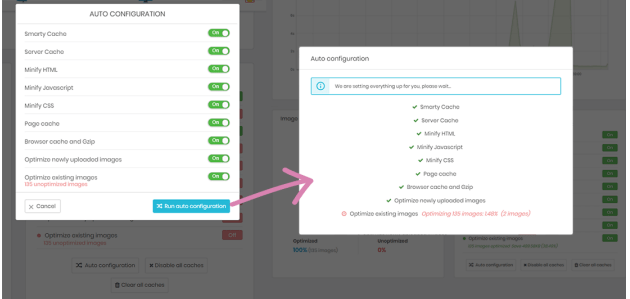
Step 3: On the auto configuration pop-up, we recommend you to turn on all
optimization options, but you may select your preferred ones. When you finish
selecting, please click “Run auto configuration” button.
You’re all done, enjoy our great module!
As you see, Super Speed is the best Prestashop module to make your website load faster! You can easily purchase and install this module by click on the link: https://addons.prestashop.com/en/website-performance/44977-super-speed-incredibly-fast-gtmetrix-optimization.html
If this article is useful for you, please share it on social media! Thank you!
 Prestashop modules & Shopify apps