Today, most news websites, online stores, and eCommerce websites would be incomplete without a mega menu. Mega menus are one of the most common elements in web interface design and are used to guide users to subordinate pages.
So what is Mega Menu? Should you use Mega Menu on your website? And if you have a Prestashop website, how do you install Mega Menu on it? What is the best PrestaShop Mega Menu modules? In this article, I’ll clarify the above issues.
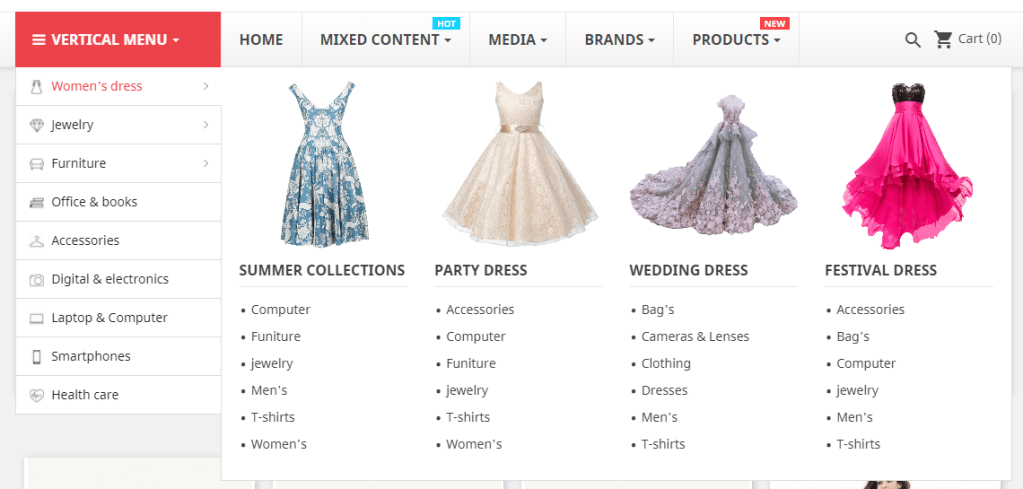
First, what is Mega Menu? Mega menu is a drop-down menu with multi-level expansions that lets you pack your website’s entire navigation into a single menu. A mega menu allows visitors to reach even the deepest sections of a website through the main menu.
So should you use Mega menu on your website? The answer is “YES”. A mega-menu can be beneficial for many types of websites. Mega menus let you visually emphasize relationships among items. This again helps users understand their choices. While plain text can be wonderful, illustrations can indeed be worth a mouthful of words.
In this article, I’ll focus the best PrestaShop Mega Menu module that compatible both Prestashop 1.7.x and Prestashop 1.6.x – Mega Menu PRO.
Features of Mega Menu PRO module:
1. Design
- 5+ mega menu templates and 8+ pre-made color skins
- Custom color selection with color picker
- 500+ Google fonts to select in 1 click
- Custom CSS with color shortcodes
- Custom CSS class support for any element
2. Performance and SEO
- Load a complex mega menu instantly with smart cache
- CSS and JavaScript optimized
- HTML optimized for better speed and SEO
3. Management
- Backend is entirely built with jQuery and Ajax
- Easily add, edit, update and duplicate any elements
- Move elements from section to section by drag and drop
- Multi-content types (text, images, categories selection, manufacturer selection, custom HTML, videos, maps…)
- Add promoted products to Prestashop menu easily
- Option to always open vertical menu
- Display shopping cart, search box, user info link and custom HTML text on the top menu.
- Import/export entire menu content (text and image) in 1 click
- Backend with tab/listing mode
4. Mobile menu
- Fully responsive Prestashop mega menu
- 3 mobile menu types (floating/side menu, bottom menu and full-screen menu)
- Smooth usability of touchscreen smartphones
- Disable/enable sticky menu on mobile
5. Localization and internationalization
- Multi-language support (For both backend and the frontend)
- RTL layout supported (Both the backend and frontend of this Prestashop mega menu module works perfectly with any RTL language)
6. Other features
- Sticky menu
- Bubble colorful highlight text
- Custom hook
- Reset to default settings option
Unlike free Prestashop mega menu module, Mega Menu PRO is smartly organized with 3 element types: menu, column, and block. It is super easy to create your mega menu and organize its menu items. Just simply dragging elements and dropping them on your menu without writing a single line of code. You can easily download this module by click on the link: https://addons.prestashop.com/en/menu/27075-mega-menu-pro.html , good luck!
 Prestashop modules & Shopify apps