It’s thought that as many as 200 million captcha tests are completed online every day. If you’ve not got a captcha test on your own website, here’s everything you need to know about them and how they can benefit your business or blog.
What is a Captcha?
CAPTCHA stands for Completely Automated Public Turing test to tell Computers and Humans Apart. In other words, CAPTCHA determines whether the user is real or a spam robot. CAPTCHAs stretch or manipulate letters and numbers, and rely on human ability to determine which symbols they are.
How does a Captcha work?
CAPTCHAs were invented to block spammy software from posting comments on pages or purchasing excess items at once. The most common form of CAPTCHA is an image with several distorted letters. It is also common to choose from a variety of images where you need to select a common theme.
Why do you need to use Captcha for your website? CAPTCHA prevents spam in website comment sections and on blogs. Many spammers bombard comment sections with links to increase search engine rankings. The test makes sure only humans comment and users don’t have to sign in beforehand to leave a comment.
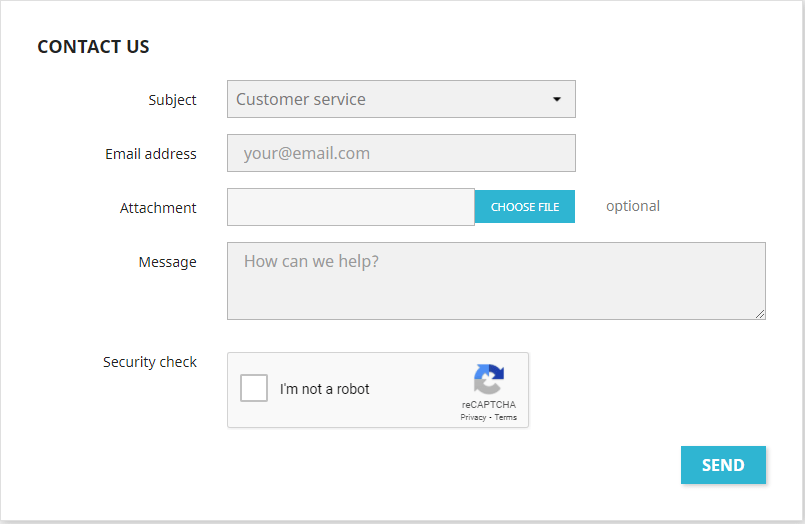
Adding captcha to your website is a security measure that is often used when site visitors sign up for accounts or send a message to the store owner. Without using a captcha, bots (as known as spambots, spam robots) can submit forms on your site, create spam accounts, and submit spam information to your store. With Prestashop website, you can install Captcha module – CAPTCHA, including captcha is not as difficult as you think: the entire process just needs a few clicks! Have you ever used free Prestashop captcha modules? It can be a big trouble when you must deal with all the manual coding changes. Let’s throw them away! Our Prestashop captcha module doesn’t require you any programming knowledge to proceed. Anybody can install and configure this module. Similar to other Prestashop module, CAPTCHA can be integrated into your store within a few clicks. Its configuration page is also very simple. Just choose your preferred captcha image type among our default options or paste your Google API key to enable Google reCaptcha. In addition, you can select to turn on captcha security for contact form or registration form separately or apply captcha for both.
Where do you need to use PrestaShop Captcha module?
Generally, e-commerce websites would use captcha to strengthen the security around the most sensitive account access points. What happens – if you are unprotected – is that your customers and email databases end up being mass-populated with spam email addresses: it is costly and time-consuming to weed these out. But don’t be worry, our captcha PrestaShop 1.6 module can be enabled on Prestashop contact form, user registration/login form, newsletter subscription, forgot password and out of product alert form of your online store providing a complete solution to protect your website from spam.
How to install PrestaShop Captcha module?
- Navigate to “Modules / Modules & Services”, click on “Upload a module /
Select file” - Select the module file “ets_advancedcaptcha.zip” from your computer then click
on “Open” to install - Click on “Configure” button of the module you just installed to open the
module’s configuration page.
As you see, Captcha is very important for PrestaShop website, using the best CAPTCHA code for your website helps you protect private information, but overuse of the Captcha window can make your website more difficult to use. Users are not shy about leaving your site when they cannot get past your basic security, and you should carefully place CAPTCHA windows in only the most needed areas. If this article is useful for you, please share it on social network as twitter, facebook, linkedin, tumblr… Thanks!
 Prestashop modules & Shopify apps